Integrating the Christmas Bundle into Your Holiday Design Workflow
The holiday season introduces a unique set of demands for designers, small business owners, and creative entrepreneurs. Between seasonal marketing campaigns, personalized gift products, and corporate greetings, the volume of visual content required increases significantly. In this high-pressure environment, efficiency and distinctiveness are not just preferences; they are operational necessities. This is where a specialized asset like the Christmas Bundle becomes a critical component of your design toolkit. Rather than treating festive typography as an afterthought, integrating a whimsical, purpose-built font collection into your early planning stages can streamline production and elevate the final aesthetic of your projects.
The Christmas Pink Bundle Font represents a shift away from traditional red-and-green clichés, offering a modern, vibrant alternative that resonates with contemporary audiences. By understanding how to deploy this asset effectively across various software platforms and physical products, you can maximize its utility while maintaining a cohesive brand voice throughout the holiday rush.
Strategic Selection and Pre-Production Planning
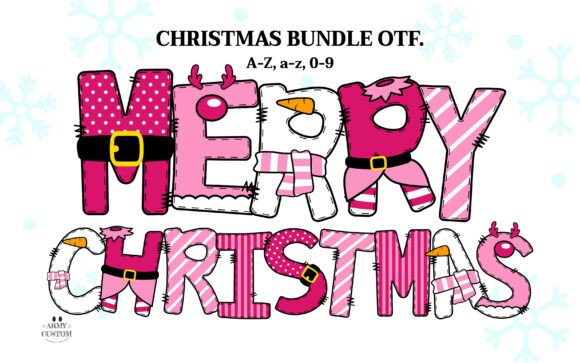
Successful holiday design begins long before the first pixel is placed or the first cut is made. It starts with asset selection that aligns with both your creative vision and technical constraints. The Christmas Bundle is characterized by its playful charm, featuring letters adorned with reindeer antlers, candy stripes, Santa belts, and snowman noses. This level of detail makes it a "display" font, meaning it is designed for headlines, short phrases, and focal points rather than body text.
When planning your seasonal product line or marketing materials, identify where high-impact typography is needed. This font is ideal for:
- Holiday Cards and Invitations: Where the message is short and the visual impact must be immediate.
- Apparel and Merchandise: Such as t-shirts, mugs, and tote bags, where the graphic element drives the purchase decision.
- Gift Tags and Packaging: Adding a personalized, festive touch to retail or handmade goods.
- Social Media Graphics: Creating eye-catching posts that stop the scroll during the crowded holiday feed.
Understanding the nature of the font helps in setting realistic expectations for your workflow. Because each letter is a complex illustration, legibility can decrease if used for long sentences. Therefore, integrate this asset into your process by reserving it for key messaging—titles, names, or single-word emphasis—while pairing it with a clean, simple sans-serif or serif font for supporting information. This contrast ensures clarity while allowing the Christmas Bundle to provide the festive flair.
Technical Compatibility and Software Integration
A common bottleneck in creative workflows is technical incompatibility. The Christmas Pink Bundle Font comes in OpenType (OTF) format, but its usage varies significantly depending on whether you are working with the color version or the black-and-white variant. Understanding these distinctions is crucial for avoiding frustration during the execution phase.
Working with Color Fonts (OpenType SVG)
The standout feature of this bundle is its vibrant pink palette and multi-colored details. These are rendered using OpenType SVG technology. To utilize the full color capabilities, you must use software that supports this standard. Specifically, Adobe Photoshop CC 2017+ and Adobe Illustrator CC 2018+ are fully compatible. In these environments, the font behaves like any other typeface: you type, and the colors appear automatically. This seamless integration allows for rapid iteration in digital designs, such as web banners, email headers, or print-ready digital proofs.
However, it is vital to note that Cricut Design Space does not support color fonts. If you attempt to load the color OTF directly into Cricut Design Space, it will not render correctly. This limitation requires a specific workflow adjustment for crafters and print-on-demand sellers who rely on cutting machines.
Workflow for Cutting Machines and Black Version
For users of Cricut, Silhouette, or other cutting machines, the bundle includes a black version of the font. This monochrome variant is fully compatible with Cricut Design Space and similar platforms. When preparing files for sublimation, vinyl cutting, or laser engraving, switch to the black version. This ensures that the intricate details—such as the scarves and antlers—are recognized as cuttable paths or printable shapes without color data interfering with the machine’s interpretation.
If you wish to retain the color aesthetic for a project destined for a cutting machine workflow (such as printed heat transfer vinyl), the recommended process is to design the text in Adobe Illustrator or Photoshop using the color font, export it as a high-resolution PNG or SVG with flattened colors, and then import that image file into your cutting software. This workaround preserves the visual integrity of the Christmas Bundle while adhering to the technical limitations of hardware tools.
Implementation in Creative Projects
Once the technical setup is complete, the focus shifts to creative implementation. The whimsical nature of the Christmas Bundle lends itself to projects that aim to evoke joy and nostalgia. Here are practical ways to integrate this font into your existing workflows:
Print-on-Demand and E-Commerce
For entrepreneurs selling holiday merchandise, speed and uniqueness are key. Use the font to create niche-specific designs. For example, combine the pink-themed typography with modern illustrations for a "Galentine’s Day" meets Christmas crossover, or pair it with minimalist graphics for a chic, contemporary look. Since the font includes numbers 0–9, it is also suitable for pricing tags, calendar designs, or countdown graphics. Ensure you mock up your designs on various products—mugs, shirts, pillows—to verify that the detailed elements remain visible at different scales.
Digital Marketing and Social Media
In digital spaces, the vibrant pink palette of the Christmas Bundle stands out against the sea of traditional red and green. Use this to your advantage in Instagram stories, Pinterest pins, and Facebook ads. Create templates in Canva or Adobe Express where the font is pre-loaded for quick customization. This allows for consistent branding across multiple posts without redesigning from scratch each time. Remember that for platforms that do not support live text editing with custom fonts, you may need to export your text as transparent PNGs to maintain the typographic style.
Personalized Stationery and Invitations
For educators, bloggers, or individuals sending holiday correspondence, the font adds a personal touch. When designing invitations, use the uppercase letters for the recipient's name or the event title. The playful characters, inspired by Santa’s helpers, create an inviting tone. Pair the font with high-quality paper textures in your digital mockups to convey the tactile quality of the final print product. This attention to detail enhances the perceived value of your design work.
Quality Control and Best Practices
To ensure professional results, adhere to a few quality control measures when using the Christmas Bundle:
- Check Kerning and Spacing: Decorative fonts often have irregular spacing due to their illustrative nature. Manually adjust the tracking and kerning between letters to ensure visual balance, especially when letters with wide elements (like those with antlers) are next to narrow ones.
- Contrast is Key: The pink palette works best against neutral backgrounds like white, cream, light gray, or soft pastels. Avoid placing it on busy patterns or dark backgrounds unless you add a contrasting outline or shadow to ensure readability.
- Resolution Management: When exporting for print, always use vector formats (PDF, EPS, SVG) if possible, or high-resolution raster images (300 DPI PNG/JPG). For web use, optimize file sizes to maintain fast loading times without sacrificing the crispness of the font details.
- Licensing Compliance: Always review the license agreement included with the Christmas Bundle. Ensure your intended use—whether commercial for client work or personal for holiday cards—is covered. Proper licensing protects your business and respects the creator’s intellectual property.
Long-Term Value and Asset Organization
Investing in a versatile font bundle like this pays dividends beyond a single season. By organizing your assets effectively, you can reuse the Christmas Bundle year after year. Store the OTF files in a dedicated "Holiday Typography" folder within your design library. Keep sample mockups and workflow notes alongside the font files to remind yourself of the compatibility nuances between the color and black versions. This preparation reduces setup time for future projects, allowing you to hit the ground running when the next holiday season approaches.
In conclusion, the Christmas Bundle is more than just a decorative typeface; it is a strategic tool for enhancing holiday design workflows. By understanding its technical requirements, leveraging its unique aesthetic, and integrating it thoughtfully into your creative process, you can produce high-quality, festive content efficiently. Whether you are crafting digital ads, physical products, or personal greetings, this font provides the playful charm and modern flair needed to celebrate the season in style.